

About the error StalledDueToSource_DiskLatency I have reported on Exchange migrations before. At that time, I was able to resolve the error by resolving a spanned volume across several disks. During another Exchange Server 2016 to Exchange 2019 migration, the problem occurred again. Here, too, the StalledDueToSource_DiskLatency error only occurred with the moverequests of the larger mailboxes:
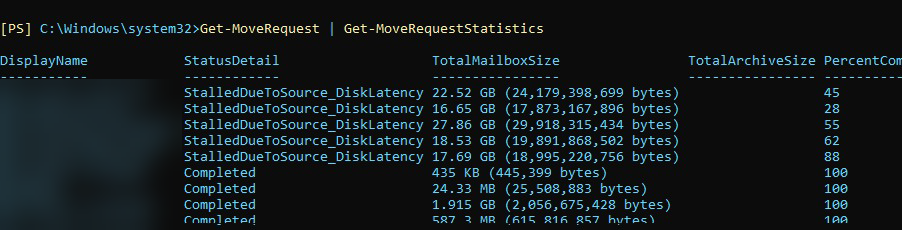
All smaller mailboxes could be moved without any problems, only the 5 largest mailboxes constantly returned the error StalledDueToSource_DiskLatency. Again, the performance values of the SSDs and the two Exchange servers were completely normal. This time it was not a spanned volume, but only a single database on an SSD. The SSD was not a top-of-the-range model, but a database, 5 mailboxes and a good 100GB of data do not put the SSD on its toes. As already mentioned, all performance counters were again completely inconspicuous. In this case, the percentage display of the move request sometimes ran up to 90%, only to start again. Even waiting for a whole weekend did not help.
I then became aware of the following Microsoft article:
The article recommends increasing the limits for workload management gradually up to a maximum of 100. I have used the following commands to adjust the WLM limit to the value 90:
$limit = 90
New-SettingOverride -Name "MdbReplication" -Component WorkloadManagement -Section MdbReplication -Parameters @("MaxConcurrency=$limit") -Reason "Allow more simultaneous mailbox moves"
New-SettingOverride -Name "CiAgeOfLastNotification" -Component WorkloadManagement -Section CiAgeOfLastNotification -Parameters @("MaxConcurrency=$limit") -Reason "Allow more simultaneous mailbox moves"
New-SettingOverride -Name "MdbAvailability" -Component WorkloadManagement -Section MdbAvailability -Parameters @("MaxConcurrency=$limit") -Reason "Allow more simultaneous mailbox moves"
New-SettingOverride -Name "DiskLatency" -Component WorkloadManagement -Section DiskLatency -Parameters @("MaxConcurrency=$limit") -Reason "Allow more simultaneous mailbox moves"
The last entry from the Microsoft article does not exist in my environment, I only get an error message:

I think it's just a typo in the article (DiskLatency and MdbDiskLatency). I have therefore only adjusted the first 4 values.
Danach noch einmal alle MoveRequests gelöscht und habe die 5 letzten größeren Postfächer eins nach dem anderen in die neue Datenbank verschoben. Immerhin ließen sich jetzt die Postfächer verschieben, sobald aber mehrere Postfächer verschoben wurden, kam es wieder zum StalledDueToSource_DiskLatency Fehler. Das 27 GB Postfach aus dem Screenshot oben, hat den ganzen Tag gebraucht, aber immerhin ist es jetzt migriert. Ich hoffe mal, das ich dieses Problem nicht noch häufiger sehe…