About the error StalledDueToSource_DiskLatency I have reported on Exchange migrations before. At that time, I was able to resolve the error by resolving a spanned volume across several disks. During another Exchange Server 2016 to Exchange 2019 migration, the problem occurred again. Here, too, the StalledDueToSource_DiskLatency error only occurred with the moverequests of the larger mailboxes:
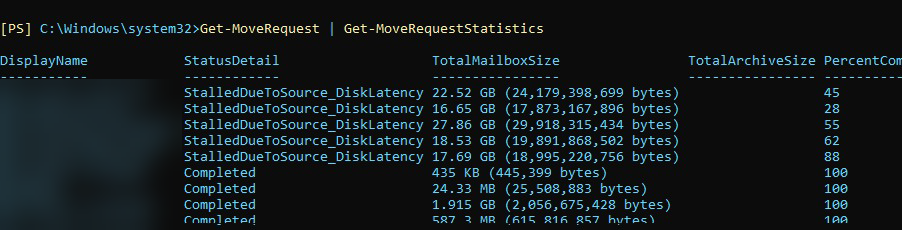
All smaller mailboxes could be moved without any problems, only the 5 largest mailboxes constantly returned the error StalledDueToSource_DiskLatency. Again, the performance values of the SSDs and the two Exchange servers were completely normal. This time it was not a spanned volume, but only a single database on an SSD. The SSD was not a top-of-the-range model, but a database, 5 mailboxes and a good 100GB of data do not put the SSD on its toes. As already mentioned, all performance counters were again completely inconspicuous. In this case, the percentage display of the move request sometimes ran up to 90%, only to start again. Even waiting for a whole weekend did not help.
I then became aware of the following Microsoft article:
The article recommends increasing the limits for workload management gradually up to a maximum of 100. I have used the following commands to adjust the WLM limit to the value 90:
$limit = 90
New-SettingOverride -Name "MdbReplication" -Component WorkloadManagement -Section MdbReplication -Parameters @("MaxConcurrency=$limit") -Reason "Allow more simultaneous mailbox moves"
New-SettingOverride -Name "CiAgeOfLastNotification" -Component WorkloadManagement -Section CiAgeOfLastNotification -Parameters @("MaxConcurrency=$limit") -Reason "Allow more simultaneous mailbox moves"
New-SettingOverride -Name "MdbAvailability" -Component WorkloadManagement -Section MdbAvailability -Parameters @("MaxConcurrency=$limit") -Reason "Allow more simultaneous mailbox moves"
New-SettingOverride -Name "DiskLatency" -Component WorkloadManagement -Section DiskLatency -Parameters @("MaxConcurrency=$limit") -Reason "Allow more simultaneous mailbox moves"
The last entry from the Microsoft article does not exist in my environment, I only get an error message:

I think it's just a typo in the article (DiskLatency and MdbDiskLatency). I have therefore only adjusted the first 4 values.
I then deleted all MoveRequests and moved the last 5 larger mailboxes one by one to the new database. At least the mailboxes could now be moved, but as soon as several mailboxes were moved, the StalledDueToSource_DiskLatency error occurred again. The 27 GB mailbox in the screenshot above took the whole day, but at least it has now been migrated. I hope I don't see this problem more often...
Moin,
meiner Meinung nach ist das ein normales Verhalten und kein wirklicher „Fehler“. Die Move-Requests werden Exchange intern mit einer sehr niedrigen Priorität behandelt, um das System nicht zu belasten. Dennoch ein guter Hinweis, dass man die throttling Werte anpassen kann. Danke!
Beste Grüße
Wenn bei einer Wochenend-Migration die letzten Mailbox Moves von großen Mailboxen lahmen, dann kann man mit
Get-MoveRequest | Set-MoveRequest -priority emergency
das Ganze beschleunigen, um vor Montag Moregn fertig sein. Das hat schon mehrfach geholfen.